
Google’s Universal Commerce Protocol (UCP) checkout, which lets a shopper buy from a retailer inside AI Mode in Google Search or on Gemini without ever landing on the store, now covers products with eligibility in Australia, alongside the United States and Canada. It is open to selected merchants only, and getting in takes more than a tidy product feed: Google has to approve a technical integration first, and no Australian retailer can switch it on from their Merchant Center account today.
Almost everything UCP asks of a store is product data you should already be getting right, and the same data feeds your ordinary Google Shopping listings whether or not you are ever approved. This piece covers what Google has published, what a Maropost Commerce Cloud (formerly Neto) store can and cannot do about it right now, and the work worth doing today.
What UCP actually is
UCP is an open standard that lets AI agents, apps and merchant systems talk to each other in one shared language, so an agent can find a product, understand a store’s checkout rules and complete a purchase without a custom integration for every retailer. It was built as an industry collaboration rather than a Google product: Google, Shopify, Etsy, Target, Walmart and Wayfair are among the companies listed as co-developers, and the specification is public.
The part shoppers see is the checkout button. On eligible product listings in AI Mode in Google Search and on Gemini, a shopper can buy in a few taps instead of being handed off to your site. Payment runs through Google Pay, drawing on the card and address the shopper already has in Google Wallet.
Google states the important part plainly: however the shopper chooses to buy, the retailer remains the merchant of record. What changes is that discovery and the transaction can happen somewhere you do not control, which is why your product data has to stand on its own.
Is UCP available in Australia?
Yes, as an eligibility geography. Google’s Merchant Center help documentation states that the UCP-powered checkout feature “only applies to products with eligibility in the United States, Canada, and Australia, and for participating merchants and partners”, and that it is available for select merchants at this time.
In May, Google put Canada and Australia in a “coming months” bucket with the United Kingdom later still. Australia is now named in the live eligibility rules instead. The gate has not moved: participation is by application, not by setting. Merchants who meet Google’s requirements express interest through a form, and Google decides.
What Google requires before a store can go live
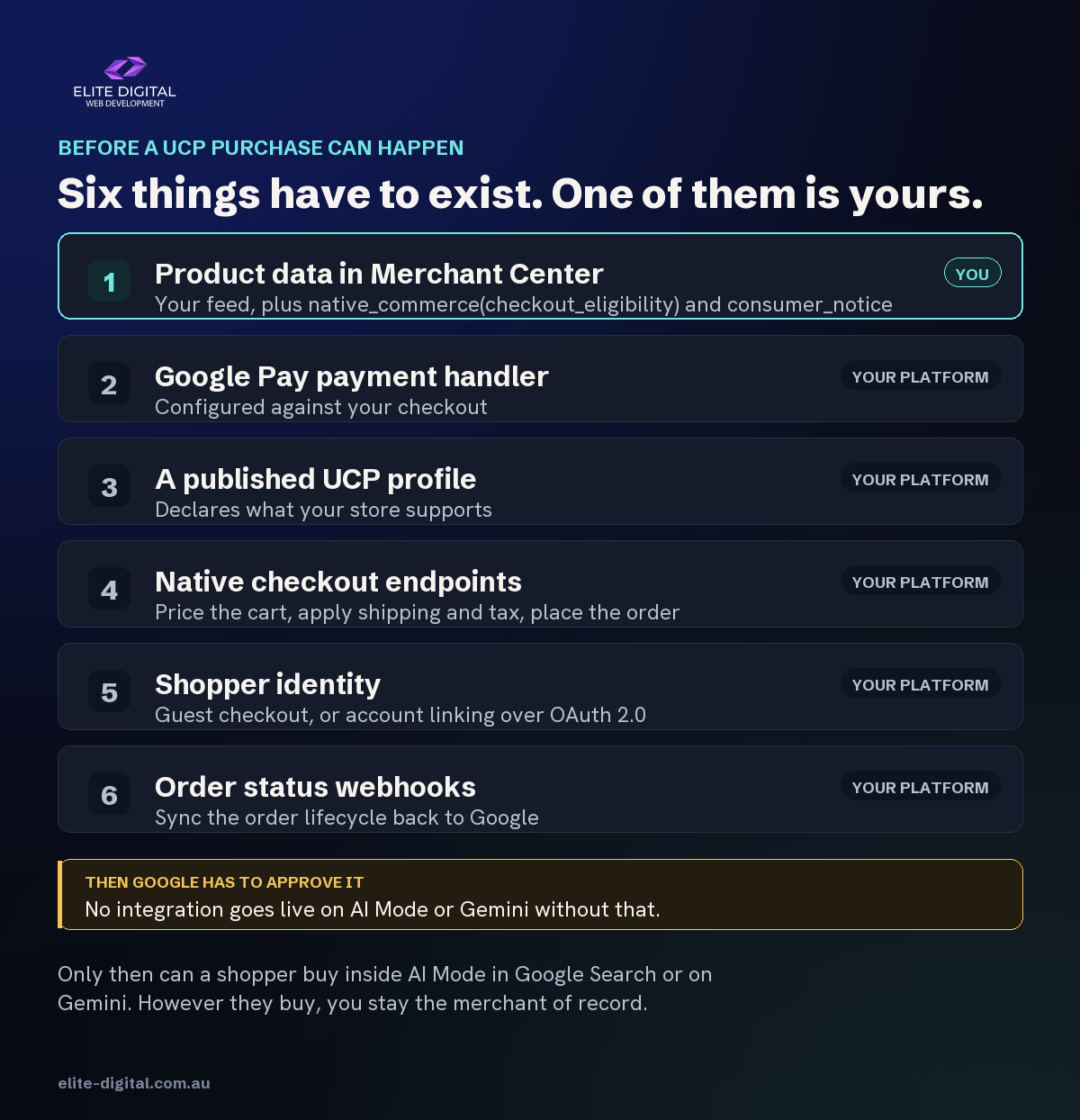
An approved technical integration, not just a feed. Google’s own implementation guide sets out six steps, and only the first is about product data:
- Prepare the Merchant Center account, then join the waitlist. Google is explicit that “your integration must be approved by Google before you can go live on AI Mode in Google Search and Gemini.”
- Configure the Google Pay integration and payment handler.
- Publish a UCP profile.
- Implement native checkout endpoints, so an agent can price a cart, apply shipping and tax rules and place an order against your backend.
- Choose how shoppers are identified, either as guests or through account linking with OAuth 2.0.
- Sync order status back to Google through webhooks across the order lifecycle.
Steps two through six are backend engineering against your ecommerce platform, not feed configuration. Most coverage of UCP skips them and leaves retailers thinking a good feed is the whole job.
Where that leaves a Neto store today
A Neto store is waiting on Maropost, not on its own catalogue. Steps two through six are built by the platform, not by the retailer. Shopify is one of UCP’s co-developers, and Shopify merchants were among the first retailers Google named as live, because that work happened on the platform’s side. Google publishes those steps for merchants to implement, and none of them is reachable from inside a hosted platform you do not control, which is why in practice the question goes to your platform provider.
We have not found any Maropost announcement about UCP support for Maropost Commerce Cloud. Read that as we could not find one, rather than there is not one: Maropost’s knowledge base blocks automated searching, so the only reliable way to settle it is to ask them, which is why that is on the list below. A custom build against the Neto API is theoretically possible and practically a large project, and it would still need Google’s approval at the end of it.
So the honest position for an Australian Neto retailer is this. You cannot switch UCP checkout on today. You can make certain that when your platform does support it, the only thing standing between you and an application is a form, rather than six months of catalogue cleanup.
The two product attributes UCP adds
UCP introduces one eligibility flag and one compliance field on top of your normal Google Shopping feed.
Checkout eligibility. The native_commerce(checkout_eligibility) attribute is a single boolean. Google’s documentation is blunt about the default: if it is set to FALSE or missing, the product is not eligible for checkout. Only listings carrying it as TRUE show the buy button.
Consumer notices. The consumer_notice attribute group carries regulatory warnings, which Google displays on the checkout screen. It takes a notice_type of legal_disclaimer, safety_warning or prop_65, and a notice_message of up to 1,000 characters accepting the <b>, <br>, <i> and <a href> tags. Responsibility for getting the warnings right sits with the merchant, not with Google. For most Australian retailers this only bites on regulated lines: prop_65 is a Californian requirement rather than an Australian one, so it matters if you sell into the United States and rarely otherwise.
Products that cannot be sold through UCP checkout
Google lists categories that must have checkout eligibility set to FALSE, and several of them are ordinary lines for an Australian retailer:
- Subscriptions, instalments and anything on recurring or mandated payment plans.
- Personalised goods, refurbished or used items, and final-sale merchandise.
- Pre-orders, and bundles that include a warranty or installation.
- Items needing special shipping, and gifting transactions.
- Age-restricted products and prohibited content, including weapons, adult material and pharmaceuticals.
- Services, rentals, virtual items and software-dependent goods.
Read that list against your own catalogue before you assume UCP is a straightforward win. A store selling refurbished stock, made-to-order product or anything requiring freight beyond a standard parcel has real exclusion work to do, and doing it badly means either losing eligible products or exposing ineligible ones.
What to do now
In priority order. Every item below improves your ordinary Google Shopping results too, which is the point: none of it is a bet on UCP.
1. Get Merchant Center to zero
- Clear every disapproval and warning, and confirm each sellable product is actually submitted and approved rather than silently dropped.
- Check identifiers first. Brand, GTIN and MPN are what Google uses to match your product to a query, and wrong identifiers are a known cause of item-level issues.
2. Fix the product data an agent will read
- Titles that describe the product completely, because an agent cannot look at your photo and infer the rest.
- Specifications, condition and availability present as text in the feed, not implied on the page.
- Price and stock in genuine sync between Neto and the feed, so nothing can be bought that you cannot ship.
3. Put a feed tool between your store and your channels
Managing UCP attributes by hand across a catalogue of any size is where this falls over. A feed management tool sits between your store’s export and Google, so you can add attributes, rewrite titles and apply inclusion rules without touching the store. DataFeedWatch has already shipped a dedicated Google Universal Commerce Protocol (UCP) channel and published a walkthrough of getting a product feed ready for UCP, including building UCP as a supplementary feed so it cannot disturb your existing Shopping campaigns.
Two practical notes for Neto retailers, both from running this setup rather than reading about it. DataFeedWatch has no native Maropost or Neto connector, so a Neto store connects through a scheduled export template served at a feed URL rather than a one-click integration. It works, and it has been working on a store we look after for years, but it is a build rather than a button.
The second note is the one that costs people money: not everything should go through the feed tool. On that same store we deliberately routed the local inventory feed straight to Merchant Center instead, because a transformation layer between your store and Google can silently remap the product id, and a feed that uploads cleanly while matching zero products looks identical to one that worked. We checked the product ids matched on both sides before deciding, and had they differed we would have gone the other way.
4. Decide which products should never be agent-bought
- Work the ineligible categories above against your own catalogue and write the rule down before anyone needs it.
- Build it as an exclusion rule in the feed, not as a manual list somebody has to remember to update.
5. Ask Maropost where they stand
- One question, in writing: is UCP support on the Maropost Commerce Cloud roadmap, and when. Their answer decides whether this is a next-quarter conversation or a next-year one.
6. Register your interest with Google
- Once you meet the requirements published in Google’s UCP developer documentation, the expression of interest form is linked from the Merchant Center help article. The requirements are public, so you can check yourself against them before you apply, and there is no cost to joining the queue.
7. Get your tracking straight
- Make sure your analytics can show what Google’s surfaces actually send you, or you will have no way to tell whether any of this worked.
What we would check first
We would start with the Merchant Center feed, because it is the front door and it is the single most common thing we find broken on Maropost and Neto stores. From there, product data quality on the lines that actually sell, then the exclusion rules, then the freight and checkout rules that an automated purchase will expose the moment it hits one.
Every one of those checks produces a count you can hold us to. Building a local inventory feed for a large Neto ecommerce store in Australia, we found their export was reporting national stock as though it sat on one store’s shelf on 71 of the 123 rows we checked, overstating one line by 386 units, and reporting six products as out of stock while units were physically on the shelf. Every obvious check passed. Feeds fail quietly, and the version of that problem an AI agent creates is a customer buying something you cannot ship.
Elite Digital builds and ships this work for Maropost and Neto retailers: the feed, the product data, the exclusion rules and the tracking. If you want to know where your store stands before your platform catches up with UCP, send us your store URL and we will look at what Google is currently receiving from it and tell you what we find, including if the answer is that it is in reasonable shape. No score, no generic report.
At a glance
| What is true today | Why it matters | What to do now |
|---|---|---|
| UCP checkout eligibility now covers Australia | Australian products are inside the rules, not outside them | Get the feed and product data to a standard that would pass |
| It is open to selected merchants by application | You cannot switch it on from Merchant Center | Meet the requirements, then register interest with Google |
| Going live needs an approved backend integration | Feed quality alone is not enough | Ask Maropost where UCP sits on their roadmap |
| Shopify is a UCP co-developer, Maropost has announced nothing | The gap is the platform, not your store | Do the feed work now, so only the platform is outstanding |
native_commerce(checkout_eligibility) defaults to FALSE |
Nothing is eligible until you deliberately flag it | Manage it as a feed rule, not by hand |
| Several ordinary categories are ineligible | Refurbished, personalised, pre-order and special-shipping lines are out | Write your exclusion rule before you need it |
| You remain the merchant of record | You keep the order and the liability for it | Fix the plumbing, not the business model |